Get Your Custom Tutorial
Pick the trick you're chasing, upload your clip, and get feedback built around your sticking point — with objective, physics-inspired explanations and trick-specific checkpoints.
AI Auto Diagnosis
Tutorials are everywhere—but they're not tailored to how you are missing the trick. Whythetrick Custom Tips starts from your clip and your selected trick, then generates advice that fits your attempt.
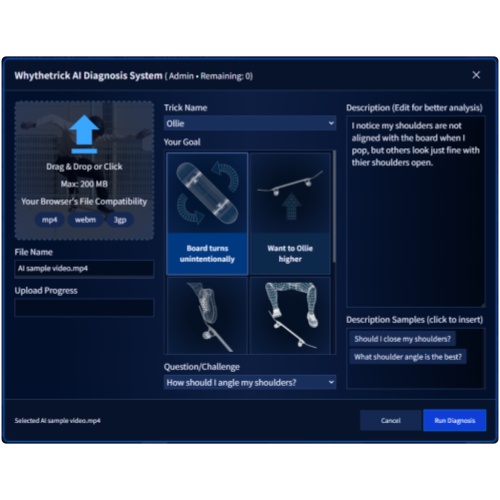
Easy & Simple UI
Choose the trick from a list (e.g., ollie, kickflip, heelflip…). Then add a short note like "board won't rotate," "landing slips out," or "can't commit."

Objective, Physics-Based Explanations
Get a grounded explanation of what's happening between your body and the board—timing, direction, balance, and how small changes affect the outcome. Clear and intuitive, without overclaiming.

Connect with others
Publish your diagnosis result and receive advise from others. Post image/video files or type SNS video URLs and they are automatically embedded.
How It Works
Get started in just three simple steps.
Create an Account
Sign up with your email address to create your account. No complicated setup is required.
Upload Your Video
Upload the video you want to analyze. Drag and drop is supported for a fast and easy workflow.
Automatic Analysis
Our AI automatically analyzes your video. View clear and actionable results directly from the dashboard.
Connect to Motion Analyzer
This system automatically suggests how you can improve your tricks. You can connect the analyzed result to the Next-Gen Motion Analyzer and analyze your movement in detail.
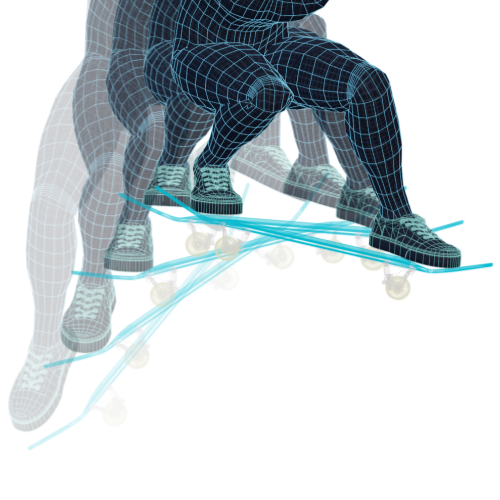
Frame-By-Frame Playback
A function that allows you to frame-by-frame playback by pushing buttons. You can adjust the number of frames freely.

Dual Play Function
A function to play 2 videos next to each other. You can change the state from Both videos, Left Only, and Right Only.

Motion Tracking
Whythetrick's AI visualizes your motion as trails. You can track up to 18 key points of your body.
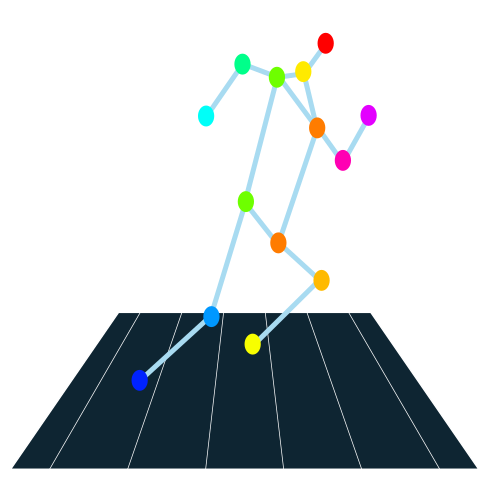
3D Simulation
A function that reconstructs movements in 3D space. You can see your movements from any angle you want.
Ready to land it?
Create an account, upload your first clip, and get feedback tailored to your exact sticking point. Free trial available.
FAQ
What does this service do?
What kinds of tricks are supported?
How do I get started?
Getting started is easy:
- Create an account with your email address
- Upload your video
- View the AI-generated analysis on your dashboard
What kind of video should I upload?
What makes the AI feedback different from regular tutorials?
Can I share my analysis results with others?
What is the Motion Analyzer?
What features does the Motion Analyzer include?
It includes:
- Frame-by-frame playback with adjustable frame steps
- Dual video playback for side-by-side comparison
- Motion tracking with up to 18 body key points
- 3D simulation to view your movement from any angle
- etc